IntroductoryIntro prices end December 31 · Solo from $9.92/month and Studio from $20.75/month, billed yearly.
See pricingVersion 1.1.0 for Mac
One download for Apple Silicon and Intel Macs. Requires macOS 14 Sonoma or later. Check your Mac.
Free for 14 days with every feature. No credit card. After the trial, choose Solo or Studio to keep going live.
StreamPort 1.1.0 has been rebuilt as a true Mac app, with the same Studio, Streamer, graphics, sound mixer and guests.
Already using StreamPort 1.0? Download once and drag the new version to Applications. Your shows, destinations, accounts and licence come across by themselves, and StreamPort keeps itself up to date from then on.
StreamPort 1.1.0 runs on these Macs with macOS 14 Sonoma or later:
To see your Mac’s model, year and macOS version, open the Apple menu › About This Mac.
If your Mac is not on the list above, or it runs macOS 13 Ventura, download StreamPort 1.0.36, the previous version. It does not include the features added in 1.1.0 and later.
“Chip: Apple M…” in About This Mac means Apple Silicon; “Processor: Intel” means Intel. StreamPort 1.0.36 needs macOS 13 or later, so macOS 12 and earlier are not supported.
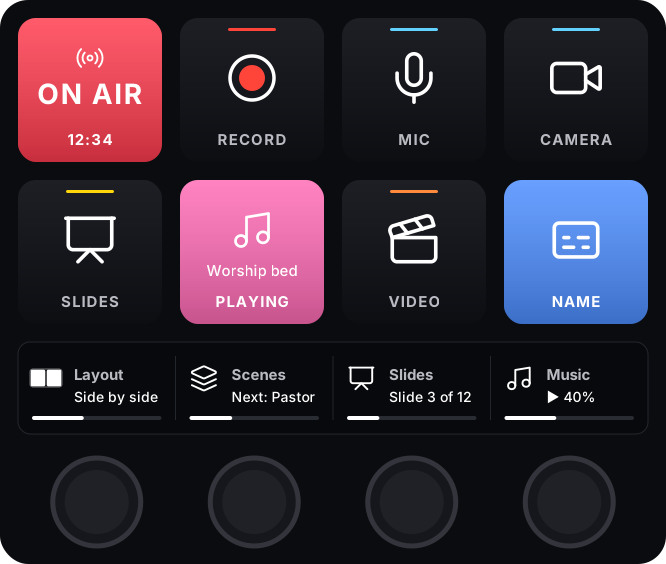
Run your show from an Elgato Stream Deck, with keys that light up with what is on air and broadcast profiles for every model.
.dmg and drag StreamPort to Applications.Read the quick start guide Download the PDF
Already bought a licence? Open Settings → License, type your email address and press Email me a code. More about licensing.

